Go to Home
Day Mode

Chromebook to Linux Wi-Fi File Transfer

Transfer files from Chromebook to Linux instantly with our Wi-Fi file transfer system — no cables, no cloud, no sign-up.

How to Connect Chromebook and Linux

Situation 1
Same Wi-Fi Network
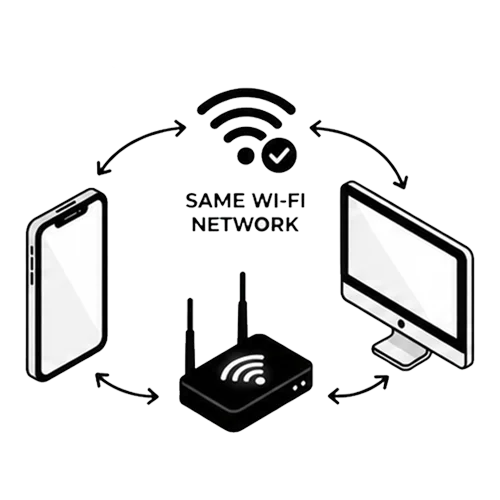
Chromebook and Linux connected to the same Wi-Fi network for file transfer
  • File transfer between Chromebook and Linux possible
  • Speed very fast, depending on Wi-Fi router/repeater location
  • Recommended by compressunder.com
Situation 2
Hotspot Shared by Third Device
Chromebook and Linux sharing files through a hotspot from a third device
  • File transfer between Chromebook and Linux possible
  • File transfer speed: very slow
  • Not recommended — only for special cases when Wi-Fi is unavailable
Situation 3
Hotspot Shared by Chromebook or Linux
File transfer between Chromebook and Linux using hotspot shared directly by sender or receiver
  • File transfer between Chromebook and Linux possible
  • Speed normal
  • Recommended by compressunder.com if Wi-Fi is unavailable

Why CompressUnder Transfer?

Zero Data Usage
Transfers between Chromebook and Linux stay within your local network — no mobile data or Wi-Fi bandwidth consumed.
Zero Cables Required
Creates a wireless bridge between your Chromebook and Linux — no USB-C or Lightning cables needed.
No Server Storage
Your files travel directly between Chromebook and Linux. Nothing is stored on any server — ever.
No Sign-Up Needed
No accounts, no emails, no passwords. Open the site on both your Chromebook and Linux and start sharing instantly.
Completely Free
No hidden fees, no subscriptions, and no limits on how many times you share between Chromebook and Linux.
Lightning Fast Speeds
Local network means no upload bottlenecks. Move gigabytes between Chromebook and Linux in seconds.
100% Privacy & Security
A private tunnel between your Chromebook and Linux. No third party — not even us — can see what you send.
Unlimited File Sizes
From a small doc to a 10GB video — transfer any file size between Chromebook and Linux without artificial limits.

Chromebook & Linux Platform Support

This tool enables seamless file transfer between Chromebook (Chrome OS) and Linux (Linux). Both devices just need a modern web browser — no extra software, plugins, or ecosystem lock-in. CompressUnder is the ultimate cross-platform alternative to AirDrop and Nearby Share.

Frequently Asked Questions

How do I transfer files from Chromebook to
Open this page on both your Chromebook and Linux. Make sure both devices are on the same Wi-Fi network. On the sending device, click "Send Files" and select your files. On the receiving device, click "Receive Files" and scan the QR code or enter the pairing code. The transfer starts instantly.
Do Chromebook and Linux need to be on the same network?
Yes, both your Chromebook and Linux need to be connected to the same Wi-Fi network or hotspot for quick and secure file transfers.
Do I need to install any software on my Chromebook or
No installation is required on either device. All file transfers happen directly through your browser on both Chromebook and Linux.
Is there a file size limit for Chromebook to Linux transfers?
There is no artificial file size limit. File size depends on your browser and network speed. For larger files, we recommend using a stable Wi-Fi connection between your Chromebook and Linux.
How secure is the transfer between Chromebook and
Transfers happen directly between your Chromebook and Linux on the same network. No files are stored on external servers, keeping your data private and secure.
Is this service completely free?
Yes, transferring files between Chromebook and Linux is completely free. No hidden fees, no subscriptions, and no limits on usage.
Do I need an account to transfer files?
No account or login is required. Just open the website on your Chromebook and Linux, connect both to the same network, and start transferring files!
Can I transfer files without Wi-Fi between Chromebook and
You need a shared network connection for transfers. If Wi-Fi is not available, you can create a hotspot on one of the devices and connect the other to it.
What file types can I transfer between Chromebook and
You can transfer any file type — documents, photos, videos, music, archives, and more. There are no restrictions on file formats.
Is this better than AirDrop or Nearby Share for Chromebook to
Unlike AirDrop (Apple only) or Nearby Share (Android/Chrome OS), CompressUnder works across all platforms including Chromebook and Linux. No ecosystem lock-in — just open your browser and share.

How Chromebook to Linux File Transfer Works

To transfer files from Chromebook to Linux, both devices must open the same website URL and be connected to the same Wi-Fi network or hotspot. This ensures fast, secure, and reliable file transfers between Chrome OS and Linux. No plugins, no software installation, and no accounts required — everything happens directly through your browser. Whether you are moving documents, photos, videos, or any other file type, our tool handles it seamlessly across Chromebook and Linux.